Your browser doesn't support the features required by impress.js, so you are presented with a simplified version of this presentation.

For the best experience please use the latest Chrome, Safari or Firefox browser.
TSQL Zaglio'S Collection
70000 lines of TSQL code useful to extend and
simplify administration of MSSQL2K, 2K5,2K8
and the life of developers
more than 300 functions
and stored procedure, collected or developed
from scratch but converted into a common style
that I hope can become a standard for your company
also thanks to the utilities to script objects.
Names

The names of objects begin with SP or FN.
I don't like this but is a wide convention.
I'm developing a parser using the GOLD Parser
to allow us to completelly change tokens.

Names want double underscore for generic routines (sp__email).
Uses same name, in upper case, with single underscore
to wrap a generic utility with application's code (SP_EMAIL).
 
The middle name identify a group.
For examples ??__str_?? are sp/fn that work around string manipulation.

But there is a better way to group a family of objects . . . 
Comments

The sp__style print snippet code to guide developers to use a common style.

Style of comments is very simple and smart because many developer
don't like complex headers.

A typical header is:

    /*
       g:utility
       v:121002\s.zaglio: added a line of code
    */


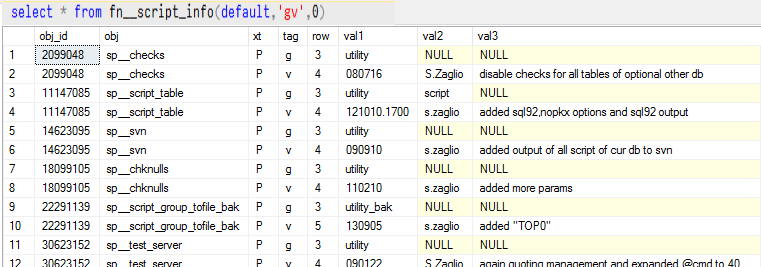
g, v are called tags. Each tag has a syntax and a function.
fn__script_info return a table with list of parsed tags for each object.
sp__script_group  uses fn__script_info to scan objects selecting those
that belong specified group (tag G), then create an update script that
uses V tag to compare newer with older objects.

If a sp__GroupName_setup exists, it is called at the begin and the end
to upgrade.

Used tags (see sp__style for details)

    v: short Version comment
    r: short Release comment
    t: test line
    c: comment line
    g: group1, group2, group3
    s: see also
    d: deprecated
    o: obsolete
    k: search keywords
    a: alias of
    j: install as job
    b: align to local application/platform version
    p: profile
usage of sp__script_group_tofile (v:130903)
    @grp     nvarchar(4000) ,
    @out     nvarchar(1024) ,
    @exclude nvarchar(4000) ,
    @include nvarchar(4000) ,
    @opt     sysname ,
    @dbg     int ,

Scope
    script each object of a group into a single file

Notes
    - a file index.txt is created and populated with the list of
      versions in CSV format:
            obj,tag,version,author,last comment

    - when single objects are scripted, the content of directory is kept and
      the list updated

Parameters
    [param]     [desc]
    @grp        group name with optional prefix @author or list of objects
                separated by | or CR/LF
    @out        destination path (a directory where put obj_name.sql and index.txt)
                if null index.txt is shown to console to be used by sp__upgrade
    @opt        options
                lo      list only, fill #objs_list without store files
    @dbg        1=show execution info
                2=show objects to script without script and save to file
                3=more up ...

Examples
    sp__script_group_tofile 'utility','%temp%\utility'
Each stored procedure is self explicant, when called  without parameters.
Links
Erland Sommarskog's home page
SQLTeam
DatabaseJournal
Bytes

Limits
Actually the user/schema is often dbo or the default.
Some sp don't manage a database different from the current.
Fast backup & restore utilities do not manage dbs of multiple files.
There are utilities to profile code and others to show statistics.

For example with sp__util_gource we can obtain something like
the nice video about the story of development.
With sp__script_group_tofile, sp__web and some other utility
we can implement a differential distributed deploy system.
  • see the list of  objects
  • see a video about a deploy
    system developed using
    utilities

Use a spacebar or arrow keys to navigate